
공유 및 가족
링크로 레시피를 공유하고, 컬렉션을 친구들에게 보여주며, 가족 구성원을 하나의 구독에 함께 묶어 보세요.
이 페이지는 영어를 기계 번역한 것이어서 일부 표현이 어색할 수 있습니다. 영어로 읽기
Your vault is private until you decide otherwise. There are four ways to let other people in — from a single recipe to the whole family — and one way to ask them for theirs.
Share a recipe by link
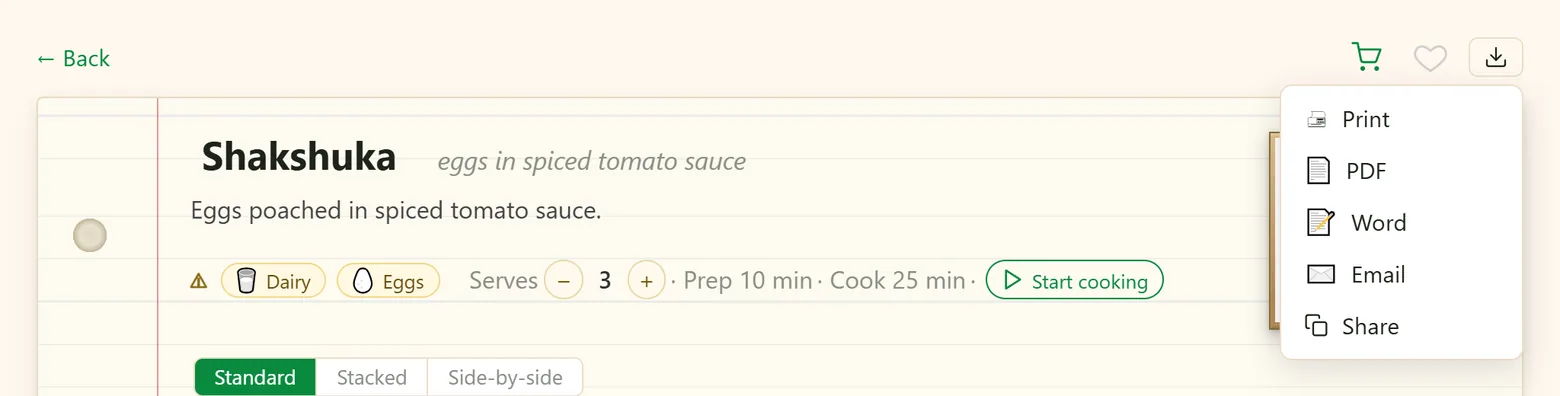
On a recipe, press ⤓ → 공유 — or, in My Recipes, the chain button next to the heart on its card. The link is ready at once. Send it: on a phone, 공유 opens the phone's own share menu (WhatsApp, Messages, Telegram); on a computer the link is copied, ready to paste into a message.
- Your friends on iwant2eat open the recipe with the link, cook from it, print it and read it in their own language. With one tap they can save a copy into their own iwant2eat. Anyone else who opens the link sees who shares the recipe, and signing up there makes them your friend and opens it; nothing in iwant2eat is public.
- You'll see it's shared — the chain button on its card turns green. That button and ⤓ on the recipe open the same menu: how many people saved the recipe and how many joined iwant2eat through its link, 링크 복사 (and 공유 on a phone), and 공유 중지, after which the link stops working at once. The same heart and chain sit above your recipes as filters: the chain there shows only the shared ones.
- When someone saves it, you get an email — at most one a day per recipe.
- Recipes saved from a website link can't be shared, even with friends — that would pass on someone else's work, so their chain button is dimmed.
Share a whole collection
In the 📁 Collections view on My Recipes, right-click a collection (long-press on a phone) → 친구와 공유. There is no link to send: your friends find it under 친구 in the top bar. They see the collection, styled with its theme, and can add it to their own. Nobody else can open it. 공유 중지 is in the same menu.
Email a recipe
⤓ → ✉️ Email sends an email from your name to any address, with the recipe in it. Replies come straight to you.
- The recipe is in the letter, so the recipient needs no account to read it. Under it is the recipe's share link, which opens for your friends on iwant2eat, and 공유 중지 turns it off.
- A recipe saved from a website is never passed on, so its email links to the original page instead.
Ask someone for a recipe
The recipe you want is often in someone else's head or notebook. On Add a recipe, press 누군가에게 레시피 부탁하기, write a few words if you like, and press 링크 만들기. Send the link any way you like — 공유 opens your phone's share menu.
- They don't need an account. The link opens a page where they can type or paste the recipe, dictate it, or photograph a notebook page — and sign it ("Mom").
- It lands in your collection, read and laid out like any recipe you add yourself, with who sent it under the title. You get an email when it arrives.
- One link, several recipes. A link takes up to 20 recipes and works for 30 days; 링크 닫기 stops it sooner. Each recipe is added to your collection like any other, so the link works while your plan lets you add recipes.
Friends
Friends are other iwant2eat users you trade recipes with. They live under 친구 in the top bar, next to Recipes. You can invite friends on any plan. You see each other's recipes while both of you have an active subscription or free trial:
- Invite — press 친구 초대, the first card there. 링크 보내기 opens your phone's share menu (Messages, WhatsApp, Telegram), 링크 복사 puts the invitation on the clipboard, and an email address takes a letter, which you can edit and translate under 텍스트 수정. The link works for 30 days and for up to 20 people; 재설정 stops it and makes a new one.
- They open it — and once they sign in, or create an account, you're friends. There is nothing else to confirm, and you get a message in the bell. A friend can be removed any time.
- See what they share — a friend's card opens their shared recipes and collections. Open a recipe to save a copy into your own collection; a whole collection is added as a linked collection, a live, read-only view that updates when they add to it. Recipes you already have are marked.
A friend sees only what you share. The quickest way is the switch 친구에게 내 레시피 모두 공개 at the top of Friends: every recipe you have and every one you add opens to your friends, except those saved from websites, and you can turn it off at any time. Otherwise share recipes one by one from a recipe's menu. A recipe's link is an invitation too, for 30 days after you last shared it: someone who isn't your friend yet sees who shares the recipe, and 무료 계정 만들기 makes you friends and opens it for them. You get a message in the bell about each friend who came through a link, with a button to remove them, and links make at most ten new friends a day.
Invitations waiting for your answer are cards there too, and so are the ones you sent by email: each says when it went out, 다시 보내기 sends a fresh letter, 복사 puts the invitation with a new link on the clipboard, and 초대 취소 withdraws it. A letter that bounced, or an invitation that expired, says so on its card.
Household members
Want the whole family in the same vault? Invite them as household members under Account → 기본 → 서브계정:
- Up to five people besides you, each with their own sign-in. They get an email invitation that stays valid for 30 days.
- One shared vault. Members see all your recipes, collections, the meal plan and the shopping list — and whatever they add is shared with everyone.
- You decide what each person may do, separately for Recipes, Shopping list and Meal planning: 읽기, 읽기 및 추가 or 전체 권한.
- One subscription covers everyone. Members don't pay; they can't invite others.
- Removing a member asks what to do with the recipes they added: keep them in your vault, or delete them along with the member.
Household members share one vault; friends each keep their own and trade recipes. Most families want the first, most friends the second.
답을 찾지 못하셨나요? 이메일로 문의해 주세요: support@iwant2eat.com