
Getting started
Create your account, put iwant2eat on your phone and save your first recipe — in about two minutes.
Look around first
Not ready to sign up? Open the demo — a ready-made account with a few sample recipes you can click through, cook from and translate. No registration, nothing to fill in.
Create your account
Sign up with your email and a password, or continue with Google, Facebook or Apple. Every new account starts with a 14-day free trial with everything included — no card required.
Your vault isn't empty on day one: four sample recipes are already there so you can try everything right away. Delete them whenever you like.
Opened iwant2eat from inside Facebook or Instagram? Those apps use their own built-in browser, where Google sign-in doesn't work. Sign up with your email instead — or open the page in Safari or Chrome first.
Confirm your email
Right after sign-up we send you a confirmation link. Click it to start adding your own recipes and to email recipes in. Until then you can browse and cook the sample recipes. If the email didn't arrive, check your spam folder or press Resend on the blue banner at the top of the page.
Put it on your phone
iwant2eat is the same account everywhere — whatever you add on your computer is on your phone a moment later, and the other way round.
- The app — get iwant2eat from the App Store or Google Play and sign in with the account you just created. It adds iwant2eat to your phone's Share menu and puts your shopping list on the home screen.
- Any browser — iwant2eat.com works on any phone, tablet or computer, nothing to install.
More in Apps, widget & extension.
Save your first recipe
Pick whichever is closest to hand:
- A link or text. Copy a recipe page's address (or the recipe itself), press the big green Add recipe button, paste and press Save recipe.
- A photo. On a phone, the camera button on the Add recipe bar opens the camera. Snap the cookbook page, the recipe card or a screenshot.
- An email. Forward a recipe to
recipe@iwant2eat.comfrom the address you signed up with.
The new recipe appears on My Recipes as ⏳ Processing… and fills in a few seconds later — title, ingredients, steps, times, servings and a photo. All the ways in are in Adding recipes.
Find your way around
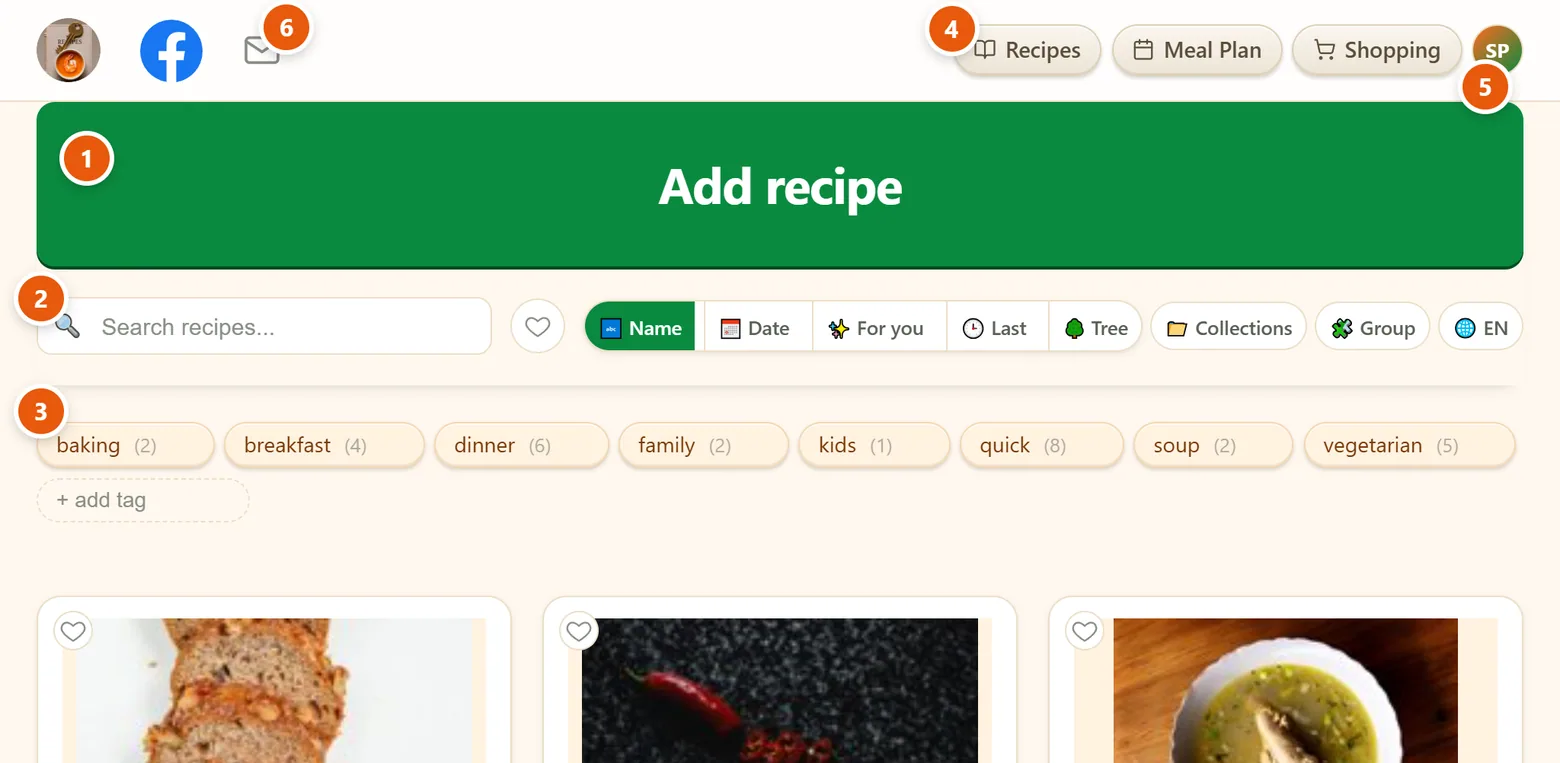
- Add recipe — paste, drop or photograph a recipe. Shown on My Recipes, your home page in iwant2eat.
- Search, favorites and sorting — find a recipe in seconds and choose how the grid is ordered and grouped.
- Tags — tap one to filter, combine several.
- Recipes · Meal Plan · Shopping — the three main parts of the app, always at the top.
- Your menu — account settings, themes, language, help and sign out.
- Contact us — writes an email to our support.
Below the recipes you'll find Ask AI, which answers questions from your own collection, and Friends' recipes — see Finding & organizing.
When the trial ends
Nothing is deleted and nothing is locked away. Your recipes stay yours to open, cook from, edit, print and export — free, for as long as you like. You can keep adding one new recipe a week; a subscription brings back unlimited recipes and Ask AI. See Subscription.
Didn't find your answer? Write to us: support@iwant2eat.com