
Sharing & family
Share recipes and collections by link, swap recipes with friends, and bring your household onto one subscription.
Your vault is private until you decide otherwise. There are four ways to let other people in — from a single recipe to the whole family.
Share a recipe by link
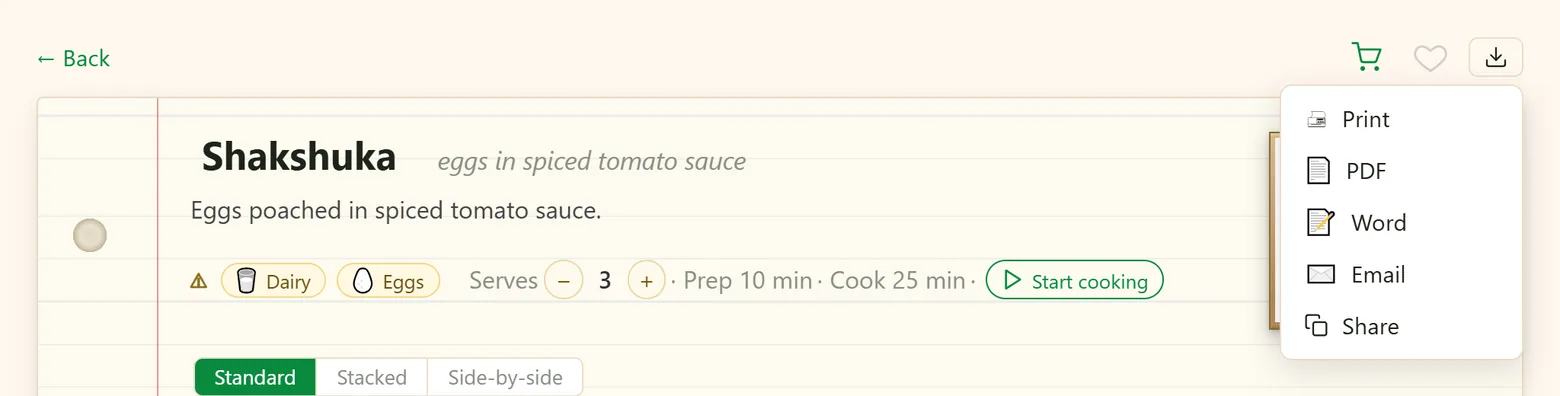
On a recipe, press ⤓ → Share. The first time, you confirm that you have the right to share it — you wrote it, photographed it, or have the author's permission. The link is copied, ready to paste into a message.
- Anyone with the link can open the recipe, cook from it and print it — no account needed. With one tap they can save a copy into their own iwant2eat.
- You'll see it's shared — a link chip on its card (tap it to copy the link again) and a shared pill on the recipe, which also has Stop sharing: the link stops working at once.
- Recipes saved from a website link can't be shared publicly — that would republish someone else's work. Type the recipe in yourself and you can share it.
Share a whole collection
In the 📁 Collections view on My Recipes, right-click a collection (long-press on a phone) → Share by link. Everyone with the link sees the collection — styled with its theme — and can save copies of its recipes. Copy share link and Stop sharing are in the same menu.
Email a recipe
⤓ → ✉️ Email sends a short email from your name to any address, with a link to the recipe. Replies come straight to you.
- The link is the recipe's share link — the recipient opens it without an account, and Stop sharing turns it off. The first time, you confirm your right to share it, as with Share.
- A recipe saved from a website is never shared publicly, so its email links to the original page instead.
Friends
Friends are other iwant2eat users you trade recipes with. Find them under Account → Friends:
- Invite — type a friend's email address, or the name they use on iwant2eat, and press Find friend and create a letter. Write a few words; if your friend reads another language, Translate turns your letter into theirs before you send it. Someone without an account is invited to create one, and you become friends as soon as they do.
- They accept — and you're friends. Invitations can be resent or cancelled; a friend can be removed any time.
- See what they share — Show what they've shared lists their shared recipes and collections. Copy puts a recipe into your own vault; a whole collection is added as a linked collection — a live, read-only view that updates when they add to it. Recipes you already have are marked.
Your friends' shared recipes also wait for you at the bottom of My Recipes, under Friends' recipes.
Household members
Want the whole family in the same vault? Invite them as household members under Account → Main → Subaccounts:
- Up to five people, each with their own sign-in. They get an email invitation that stays valid for 30 days.
- One shared vault. Members see all your recipes, collections, the meal plan and the shopping list — and whatever they add is shared with everyone.
- You decide what each person may do, separately for Recipes, Shopping list and Meal planning: Read, Read & add or Full access.
- One subscription covers everyone. Members don't pay; they can't invite others.
- Removing a member asks what to do with the recipes they added: keep them in your vault, or delete them along with the member.
Household members share one vault; friends each keep their own and trade recipes. Most families want the first, most friends the second.
Didn't find your answer? Write to us: support@iwant2eat.com